接口操作-处理Cookie参数
使用 Cookie 的 HTTP 接口
接口路由访问规则参考 接口操作-创建接口
问题背景
使用 Cookie 的 HTTP 接口
解决方案
接口定义 节点发出的消息包含 msg.req.cookies 属性,该属性列出了当前请求中设置的 Cookie。
接口响应 节点将使用 msg.cookies 属性来设置或清除 Cookie。
HTTP 请求 节点将接受一个包含要在该请求中发送的 Cookie 的输入属性 msg.cookies。
示例
该示例提供了三个 HTTP 接口: /public/hello-cookie: 返回一个页面,列出当前设置的 Cookie。 /public/hello-cookie/add: 添加一个新的 Cookie 并重定向回 /public/hello-cookie 页面。 /public/hello-cookie/clear: 清除所有由该示例创建的 Cookie 并重定向回 /public/hello-cookie 页面。
流程说明:
- 获取和显示 Cookie (/public/hello-cookie):
接口定义节点: 监听 GET 请求到 /hello-cookie。函数节点 (Format cookies): 将 msg.req.cookies 对象转换为 JSON 字符串,并将其赋值给 msg.payload。模板转化节点: 生成一个 HTML 页面,显示 msg.payload 中的 Cookie 列表,并提供“添加 Cookie”和“清除 Cookie”的链接。接口响应节点: 将 HTML 页面发送回客户端。
- 添加 Cookie (/public/hello-cookie/add):
接口定义节点: 监听 GET 请求到 /hello-cookie/add。函数节点 (Add a cookie): 创建 msg.cookies 对象,并添加一个以 demo- 开头的新 Cookie,其值为当前时间戳。调整消息属性节点 (Redirect to /public/hello-cookie): 设置 msg.statusCode 为 302(重定向),并设置 msg.headers.location 为 /public/hello-cookie,以便在设置 Cookie 后跳转回主页面。接口响应节点: 发送重定向响应。
- 清除 Cookie (/public/hello-cookie/clear):
接口定义节点: 监听 GET 请求到 /public/hello-cookie/clear。函数节点 (Clear cookies): 遍历 msg.req.cookies,找到所有以 demo- 开头的 Cookie,然后将 msg.cookies 对象中的这些 Cookie 的值设置为 null 以清除它们。调整消息属性节点 (Redirect to /public/hello-cookie): 设置 msg.statusCode 为 302(重定向),并设置 msg.headers.location 为 /public/hello-cookie,以便在清除 Cookie 后跳转回主页面。接口响应节点: 发送重定向响应。
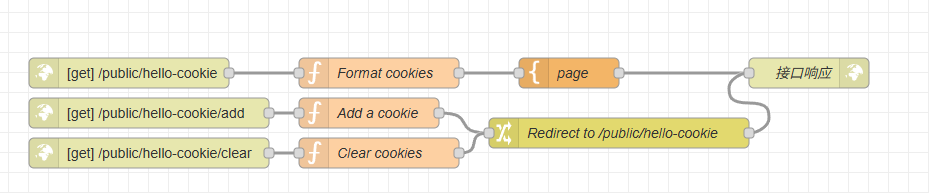
示例JSON
[{"id":"c362b989.954ae8","type":"http in","z":"65b5dbf44a0ca401","name":"","url":"/hello-cookie","method":"get","upload":false,"swaggerDoc":"","advancedoptions":false,"apiAuth":"public","x":180,"y":2780,"wires":[["21ddf71f.d00518"]]},{"id":"21ddf71f.d00518","type":"function","z":"65b5dbf44a0ca401","name":"Format cookies","func":"msg.payload = JSON.stringify(msg.req.cookies,null,4);\nreturn msg;","outputs":1,"noerr":0,"initialize":"","finalize":"","libs":[],"x":430,"y":2780,"wires":[["f3aa98c1.befc18"]]},{"id":"f3aa98c1.befc18","type":"template","z":"65b5dbf44a0ca401","name":"page","field":"payload","fieldType":"msg","format":"handlebars","syntax":"mustache","template":"<html>\n <head></head>\n <body>\n <h1>Cookies</h1>\n <p></p><a href=\"hello-cookie/add\">Add a cookie</a> • <a href=\"hello-cookie/clear\">Clear cookies</a></p>\n <pre>{{ payload }}</pre>\n </body>\n</html>","x":620,"y":2780,"wires":[["503221f3bde1712f"]]},{"id":"9a2a9a4.0fc0768","type":"change","z":"65b5dbf44a0ca401","name":"Redirect to /public/hello-cookie","rules":[{"t":"set","p":"statusCode","pt":"msg","to":"302","tot":"num"},{"t":"set","p":"headers","pt":"msg","to":"{}","tot":"json"},{"t":"set","p":"headers.location","pt":"msg","to":"/prod-api/noco-instance/stotest/public/hello-cookie","tot":"str"}],"action":"","property":"","from":"","to":"","reg":false,"x":670,"y":2840,"wires":[["503221f3bde1712f"]]},{"id":"afefb90.53dcf48","type":"function","z":"65b5dbf44a0ca401","name":"Add a cookie","func":"msg.cookies = { };\nmsg.cookies[\"demo-\"+(Math.floor(Math.random()*1000))] = Date.now();\nreturn msg;","outputs":1,"noerr":0,"initialize":"","finalize":"","libs":[],"x":420,"y":2820,"wires":[["9a2a9a4.0fc0768"]]},{"id":"d5205a2c.db9018","type":"function","z":"65b5dbf44a0ca401","name":"Clear cookies","func":"// Find demo cookies and clear them\nvar cookieNames = Object.keys(msg.req.cookies).filter(function(cookieName) { return /^demo-/.test(cookieName);});\nmsg.cookies = {};\n\ncookieNames.forEach(function(cookieName) {\n msg.cookies[cookieName] = null;\n});\n\nreturn msg;","outputs":1,"noerr":0,"initialize":"","finalize":"","libs":[],"x":430,"y":2860,"wires":[["9a2a9a4.0fc0768"]]},{"id":"fda60c66.04975","type":"http in","z":"65b5dbf44a0ca401","name":"","url":"/hello-cookie/add","method":"get","upload":false,"swaggerDoc":"","advancedoptions":false,"apiAuth":"public","x":200,"y":2820,"wires":[["afefb90.53dcf48"]]},{"id":"35285a76.1f8636","type":"http in","z":"65b5dbf44a0ca401","name":"","url":"/hello-cookie/clear","method":"get","upload":false,"swaggerDoc":"","advancedoptions":false,"apiAuth":"public","x":200,"y":2860,"wires":[["d5205a2c.db9018"]]},{"id":"503221f3bde1712f","type":"http response","z":"65b5dbf44a0ca401","name":"接口响应","statusCode":"","headers":{},"commonTemplate":false,"responseCode":0,"responseCodeType":"num","responseData":"payload","responseDataType":"msg","responseMsg":"success","responseMsgType":"str","x":860,"y":2780,"wires":[]}]
运行结果
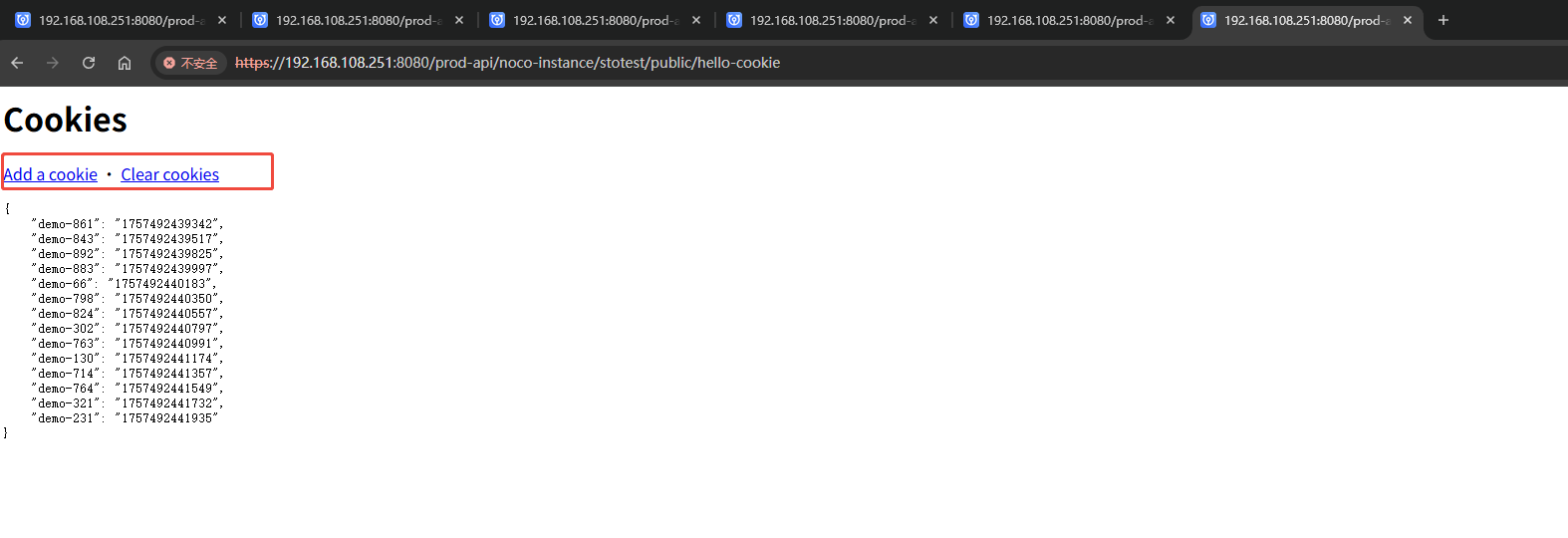
浏览器输入访问连接:https://192.168.108.251:8080/prod-api/noco-instance/stotest/public/hello-cookie
在浏览器当前请求接口页面 F12 查看 Cookie 是否生效:
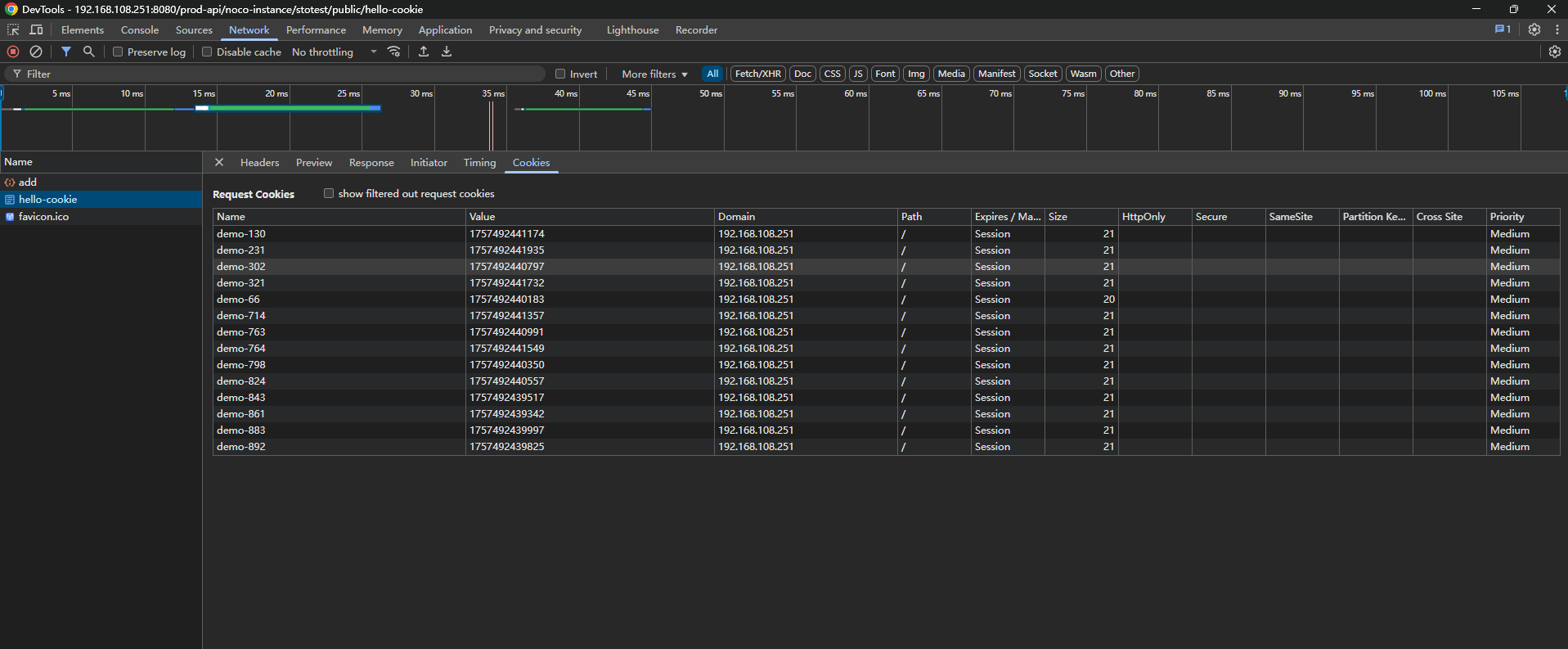
-
访问主页: 使用浏览器或
curl访问https://192.168.108.251:8080/prod-api/noco-instance/stotest/public/hello-cookie。 您将看到一个页面,显示当前没有设置 Cookie(或者浏览器/curl 会话中已有的其他 Cookie),以及“Add a cookie”和“Clear cookies”的链接。 -
添加 Cookie: 点击页面上的“Add a cookie”链接(或访问
https://192.168.108.251:8080/prod-api/noco-instance/stotest/public/hello-cookie/add)。 浏览器将被重定向回https://192.168.108.251:8080/prod-api/noco-instance/stotest/public/hello-cookie。现在,页面上应该会显示一个新的以demo-开头的 Cookie,其值是一个时间戳。 -
清除 Cookie: 点击页面上的“Clear cookies”链接(或访问
https://192.168.108.251:8080/prod-api/noco-instance/stotest/public/hello-cookie/clear)。 浏览器将被重定向回https://192.168.108.251:8080/prod-api/noco-instance/stotest/public/hello-cookie。页面上所有以demo-开头的 Cookie 应该已经被清除。
-
msg.req.cookies属性是一个键/值对的对象,包含当前请求中设置的 Cookie。var mySessionId = msg.req.cookies['sessionId']; -
为了在响应中设置 Cookie,应将
msg.cookies属性设置为类似的键/值对象。- 值可以是一个字符串,用于设置具有默认选项的 Cookie 值。
- 或者,它可以是一个包含选项的对象。
以下示例设置了两个 Cookie:一个名为
name,值为Nick;另一个名为session,值为1234,过期时间设置为 15 分钟。msg.cookies = {
name: 'nick',
session: {
value: '1234',
maxAge: 900000 // 15分钟,单位毫秒
}
} -
有效的选项包括:
domain: (String) Cookie 的域名。expires: (Date) GMT 格式的过期日期。如果未指定或设置为 0,则创建会话 Cookie。maxAge: (String) 相对于当前时间的过期日期(以毫秒为单位)。path: (String) Cookie 的路径。默认为/。value: (String) Cookie 的值。
-
要删除一个 Cookie,将其值设置为
null。msg.cookies = {
myCookieToDelete: null
}
Cookie 的 URL 编码
HTTP 请求 节点将接受 Cookie 中 encode : false 的属性,这将避免在请求发送时对值进行 URL 编码。
msg.cookies = {
  myCookie : {
      Path : "/",
      value : "ysjLVJA==",
      encode : false
  }
}