接口操作-响应JSON数据
通过 HTTP 请求响应 JSON 数据
接口路由访问规则参考 接口操作-创建接口
问题背景
通过 HTTP 请求响应 JSON 数据
解决方案
通过设置 msg.headers 对象,将响应的 Content-Type 设置为 application/json
示例
该流程包含四个节点:
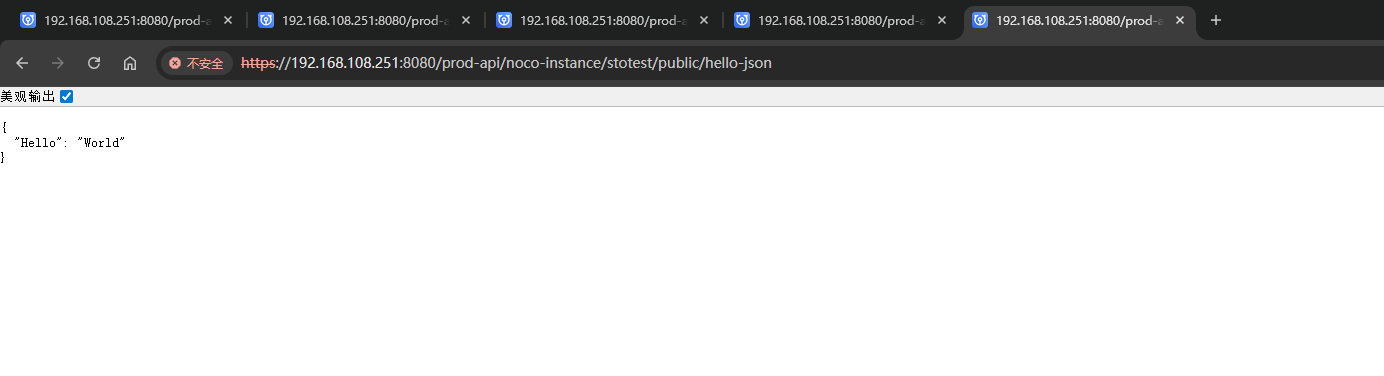
接口定义节点: 配置为监听 GET 请求到 /prod-api/noco-instance/stotest/public/hello-json。模板转化节点: 生成一个包含 JSON 字符串的 msg.payload。在此示例中,它生成{ "Hello": "World" }。调整消息属性节点 (Set Headers):首先,它创建一个空的 msg.headers 对象。然后,它将msg.headers['content-type']设置为字符串application/json。这是关键步骤,它告诉客户端响应的内容类型是 JSON。接口响应节点: 将带有正确Content-Type头的msg.payload作为 HTTP 响应发送。

示例JSON
[{"id":"c8107088.37ef9","type":"http in","z":"65b5dbf44a0ca401","name":"","url":"/hello-json","method":"get","upload":false,"swaggerDoc":"","advancedoptions":false,"apiAuth":"public","x":260,"y":1700,"wires":[["4e8237da.b17dc8"]]},{"id":"4e8237da.b17dc8","type":"template","z":"65b5dbf44a0ca401","name":"page","field":"payload","fieldType":"msg","format":"handlebars","syntax":"mustache","template":"{ \"Hello\": \"World\" }","x":470,"y":1700,"wires":[["65401623.9abfe8"]]},{"id":"65401623.9abfe8","type":"change","z":"65b5dbf44a0ca401","name":"Set Headers","rules":[{"t":"set","p":"headers","pt":"msg","to":"{}","tot":"json"},{"t":"set","p":"headers.content-type","pt":"msg","to":"application/json","tot":"str"}],"action":"","property":"","from":"","to":"","reg":false,"x":630,"y":1700,"wires":[["a080a5310cb2a766"]]},{"id":"a080a5310cb2a766","type":"http response","z":"65b5dbf44a0ca401","name":"接口响应","statusCode":"","headers":{},"commonTemplate":false,"responseCode":0,"responseCodeType":"num","responseData":"payload","responseDataType":"msg","responseMsg":"success","responseMsgType":"str","x":840,"y":1700,"wires":[]}]
运行结果
接口响应 节点中返回的头部可以通过 msg.headers 属性进行设置。它应该是一个由键/值对组成的 JavaScript 对象,每个键/值对代表一个头部。
为了返回格式良好的 JSON,Content-Type 头部应该设置为 application/json,这样接收方就知道如何将其作为 JSON 数据处理。
浏览器访问:https://192.168.108.251:8080/prod-api/noco-instance/stotest/public/hello-json